SSH Tunneling to the Central Resource Daemon
NOTICE: If you used the ONL testbed prior to August 2006 and
are now having difficulties connecting to the testbed, you should change
some parameters in your SSH tunnel.
The differences are shown in red below whenever
possible.
The RLI can be run without connecting to the ONL resources if all
you want to do is to specify a network and save the configuration
to your local file.
But if you want to actually ask for resources (File => Commit),
you will need to communicate to the Central Resource Daemon (CRD)
through an SSH tunnel.
The CRD communicates with the RLI through TCP port 7070 on host
onlsrv.
In order to commit resources, you will have to setup an SSH tunnel to
onlsrv, port 7070 BEFORE
you select File => Commit.
In fact, we normally setup the tunnel before we even start the RLI.
This page provides instructions for setting up the SSH tunnel on
both Linux and Windows platforms.
The next section describes the SSH tunnel concept, and then
we give three recipes for constructing the SSH tunnel.
If you want to skip the concept section, just select the link below
that applies to your case and you will get a recipe:
The Unix command line approach is the simplest if that is available.
The SSH Tunnel Concept
Suppose we want to run our RLI on HostA which needs to
connect through our firewall to the CRD
listening on port P=7070 on onlsrv.
		 -------	 ||	  --------
		|  RLI  |========XX.....P| Server |
		 -------	 ||	  --------
		  HostA	      Firewall	   onlsrv
SSH tunneling or port forwarding allows us to traverse the firewall
by setting up an SSH connection through the firewall and then using
that channel to pass our application's data. We use the special form of port
forwarding shown below where we connect to the CRD running on the host
running the SSH daemon by making all traffic going to
localhost, port 7070 go to the CRD which is
running on onlsrv and listening on port 7070:
	       (localhost)
	 	  HostA			   onlsrv
		 -------	 ||  	  --------
		|  RLI	|	 ||	 |   CRD  |
		 -------	 ||  	  --------
		   || 		 ||	  P = 7070
		   || 		 ||	     ||
		Q = 7070	 ||	     ||
		 -------	 ||	  --------
		|  ssh	|==============22|  sshd  |
		 -------	 ||	  --------
		  HostA	      Firewall	  SshdHost = onlusr
		  	  onl.arl.wustl.edu
An SSH (and therefore encrypted) connection is made between HostA
(ssh client) and SshdHost (ssh daemon on onlusr).
Unencrypted connections
are made between the RLI and the ssh client and the ssh server
and application server. The RLI now connects to port Q on
localhost (127.0.0.1).
Its traffic (encrypted) to/from onlusr passes over
the "tunnel" between HostA and onlusr
to the CRD which is listening on TCP port 7070.
This can be generalized to support multiple connections to multiple
end hosts over the same ssh connection, but we will not describe that here.
Unix Recipe (or any command-line window on Windows)
(Note: This is known to work on RedHat 7.x
and SunOS 5.8 using Open SSH and SSH Secure Shell 3.2.0 from SSH
Communications Security Corp.)
- At the command line:
ssh -L 7070:onlsrv:7070
onl.arl.wustl.edu
- The general form of the -L argument is: Local port
number (7070); Remote host name
(onlsrv);
and Remote port number (7070).
This part defines the tunnel going from
the login host to the ONL Central Daemon.
- The command says that you want to log into
onl.arl.wustl.edu
and create a tunnel to port 7070
on host onlsrv
where the ONL Central Resource
Daemon resides.
But
onl.arl.wustl.edu
is really a public name
associated with several ONL services.
In the case of SSH, you will end up on the host
designated for user logins (currently
onlusr).
- Often, users define an alias for this command which
can be used as a shorthand for the entire
command.
- Your RLI should now connect to (host='localhost',
port=7070) instead of
(host=onlsrv, port=7070).
- Kill the ssh client when you are done using the
tunnel.
- Here is a form that uses the -f flag:
ssh -f -L
7070:onlsrv:7070
onl.arl.wustl.edu
- The -f puts the ssh process into the background.
Alternatively, you could use the '-fo' flag
for "one shot forwarding"; i.e., the ssh client
terminates when the number of forwarded
connections drops to 0.
Windows PuTTY Recipe
PuTTY is a popular tool for making SSH connections that can be obtained
from http://www.putty.nl.
The following recipe leads you through steps for setting up an SSH tunnel
to the CRD using PuTTY.
When you are done, you will have a PuTTY entry that can be used without
reentering the tunnel details each time you run the PuTTY tool.
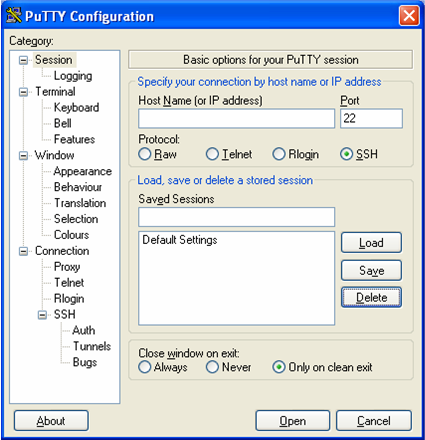
- Click on the PuTTY desktop icon.
You will get the Session window shown below.
- To define the tunnel details, select the
Connection => SSH => Tunnels Category item.
You will get a window that allows you to specify the details of
the SSH tunnel.

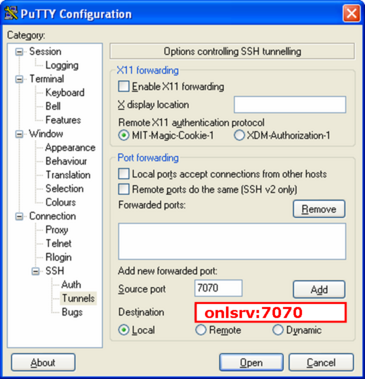
- Fill in the Source port and Destination fields
as shown below.
Enter 7070 in the Source port field, and enter
onlsrv:7070 in the Destination field.
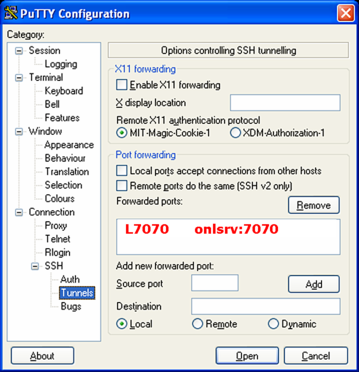
Now, select Add to add your entry to the list of forwarded ports.
Note that Local is marked.
This setup means that the RLI messages that will go to port 7070
at the localhost will be tunneled over the SSH connection to port
7070 at host onlsrv.
(Note that Remote should NOT be marked since that would allow
a remote user to use your SSH tunnel.)
- Now we move on to associating the label rli (or whatever
you would like to call this setup) with the tunnel that you just
defined.
This is called defining a session in PuTTY.
Return to the PuTTY Session window by selecting the Session
Category.
Fill in the Host Name and Saved Sessions fields.
Enter onl.arl.wustl.edu
in the Host Name field, and
enter rli in the Saved Sessions field.
Then, select Save to save the entry.
Now, we can attempt to make the tunneled SSH connection by selecting
Open or exit PuTTY and make the SSH connection at a later
time.

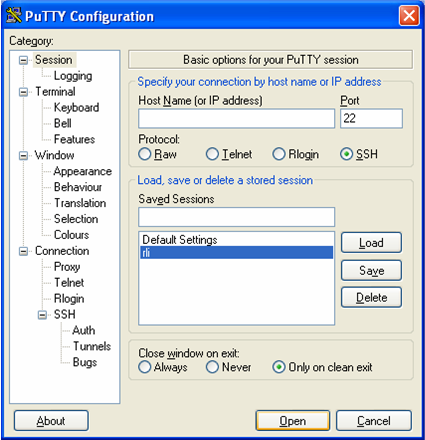
- If we exit PuTTY and then run it at a later time, you will get the
following window which shows the rli entry that we defined
above.
The tunneled SSH connection can now be made by selecting rli
and then selecting Open or just double clicking the rli
entry.
Windows SSH Client Recipe
Note 1:
The syntactic details may vary from one tool to another.
Note 2: This is known to work for SSH clients on
Windows 2000 and Windows XP using SSH Secure Shell
3.2.0 from SSH Communications Security Corp.
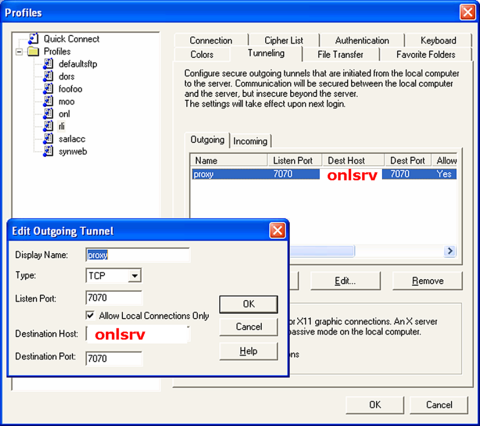
The two figures below show how I have setup my tunnel.
The menu item is labeled rli and the tunnel name is
proxy.
- Start your ssh client
- Click "Profiles => Add Profile" to add a new connection
profile which you will name and later edit.
I have named my profile rli.
- Click "Profiles => Edit Profile" and you will see
something like the figure below.
Here, I have already created the rli profile.
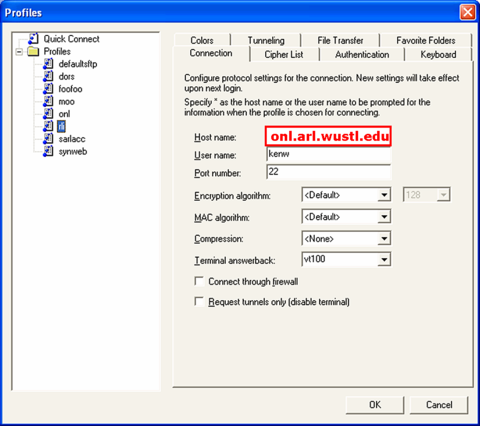
- Fill out the Connection tab so that the Hostname
is onl.arl.wustl.edu, the host running the CRD.
- Click the "Tunneling" tab; click the "Add button;
and then fill in the dialog box.
There are six columns: Name, Listen Port,
Dest Host, Dest Port, Allow, Type.
For example, the figure below shows:
- "Display Name" = proxy
- "Listen Port" = 7070
- "Destination Host" =
onlsrv
- "Destination Port" = 7070
- Check "Allow Local Connections Only"
(THIS IS VERY IMPORTANT)
- "Type" = TCP
- Click "OK"
- Your RLI should now connect to the CRD (running on
onlsrv
and listening on port 7070) through host='localhost',
port=7070.
Comments and Caveats
- Caveat 1: Any user can connect to the client-side of
the tunnel from the client host.
- Caveat 2: Do NOT use the -g flag in Unix or uncheck
"Allow Local Connections Only" in Windows. This will
allow anyone who can connect to the client host at
port Q to use your tunnel.
References
- ssh manual pages
- SSH, The Secure Shell, The Definitive Guide
by Daniel J. Barrett and Richard E. Silverman,
O'Reilly, 2001 (Chapter 9)
- Type "ssh port forwarding" into Google or some other
search engine.
Revised: Mon, Aug 14, 2006